Insights Studio
Insights Studio gets your reporting stack built and ready to go. You get a Looker Studio dashboard configured for your team, automated alerts sent to wherever your team already works, and one workflow automation included from day one.
Insights Studio sets up the reporting your team uses every day. You get a clear, branded Looker Studio report, scheduled anomaly alerts delivered to the tools you already use, and one workflow automation that removes a small recurring task. The aim is straightforward: keep the right people informed about key metrics and make it easy to take action when something changes.
Looker Studio Dashboards
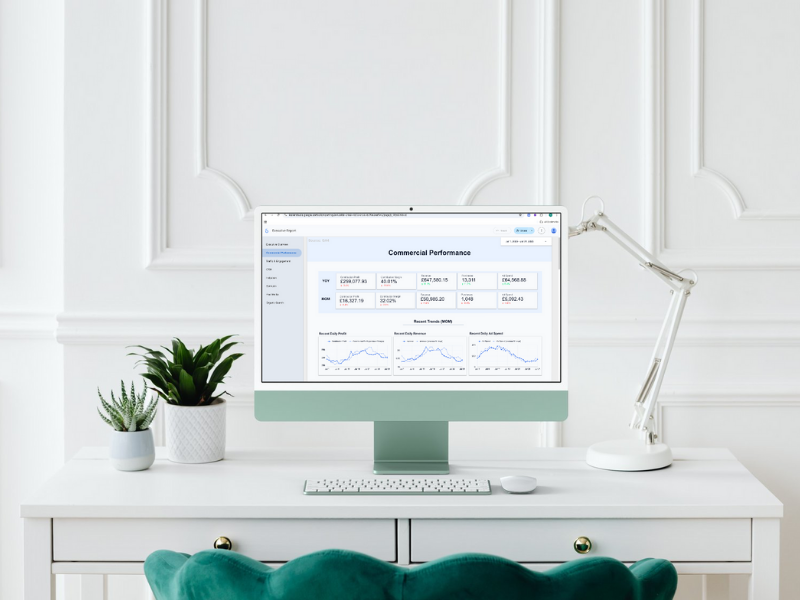
A branded Looker Studio report with a dedicated page for each part of the business that needs visibility. The default setup covers Executive overview, Commercial performance (revenue vs spend), Paid Media, SEO/Organic, and Traffic & Engagement.
Scheduled Alerts & Notifications
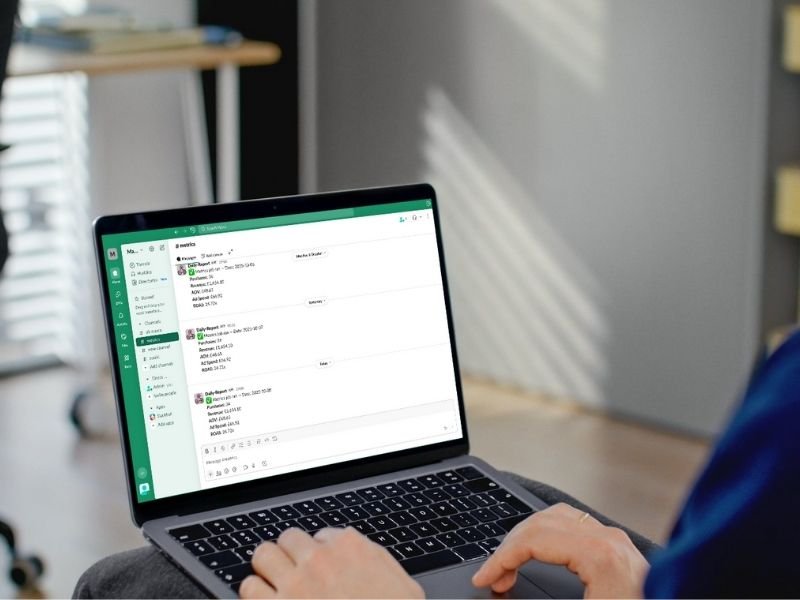
Scheduled checks & notifications on the metrics that move decisions, sent directly to notifications teams who need to act on them.
This can be on a daily, weekly or a schedule of your choosing. Choose 3–5 signals to start, common picks are ROAS, ad spend, revenue, add-to-cart rate, checkout rate, and sessions.
Each alert includes a seven-day baseline and a link back to the relevant dashboard view.
Delivery options include: Slack, Microsoft Teams, Google Chat, or Email.
Optional tasks: Create follow-up items in Asana, Jira or ClickUp.
Workflow Automation
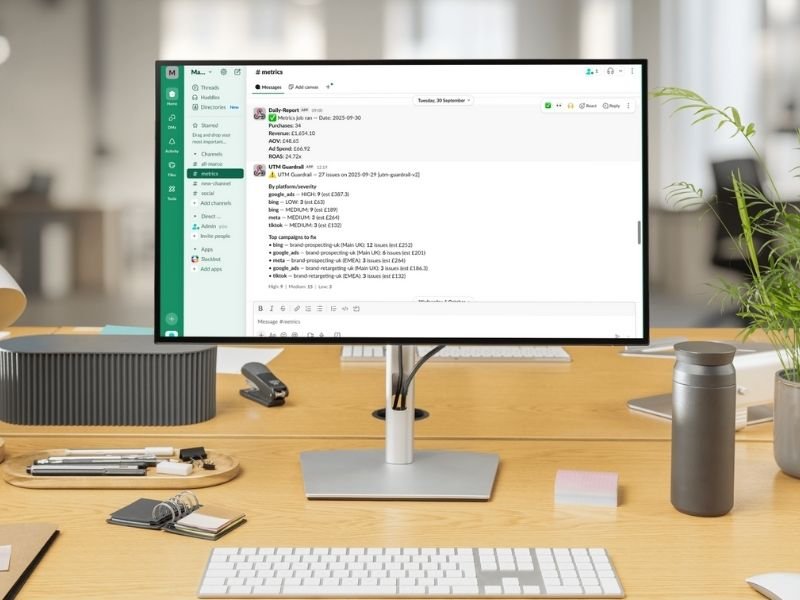
Every setup includes one workflow automation chosen during discovery. The most common options are:
- Low-Stock Risk Pings — flags SKUs running ads when stock is low or out of stock.
- 404 → Redirect Map — a weekly list of new 404s with suggested redirect destinations.
- UTM Guardrail — a daily scan for missing or incorrect UTMs across active ads.
We’ll help you pick the right fit. You can swap it later if priorities shift.
How It Works
- Discovery (45 minutes) — One call to cover the essentials: which KPIs to track, data access, alert rules, and where notifications should land. We also agree on the workflow automation to include and set up any task system connections if you want automated follow-up items created automatically.
- Implementation (Days 1–7) — he report gets configured and connected to your data sources. Alerts are built and tested to your chosen channels so you can confirm everything arrives correctly before handover.
- Handover & iteration (Days 8–14) — The workflow automation is delivered in the second week alongside a short Loom walkthrough covering how to read the report, adjust alert thresholds, and make basic edits yourself. We agree on next steps at the end.
Dashboard Options
You can run everything inside one report or split it into separate dashboards by team. A single unified report works well when everyone reviews the same data. Alternatively, separate dashboards make more sense when departments need their own view and shouldn’t be scrolling past pages that aren’t relevant to them. The most common configurations are:
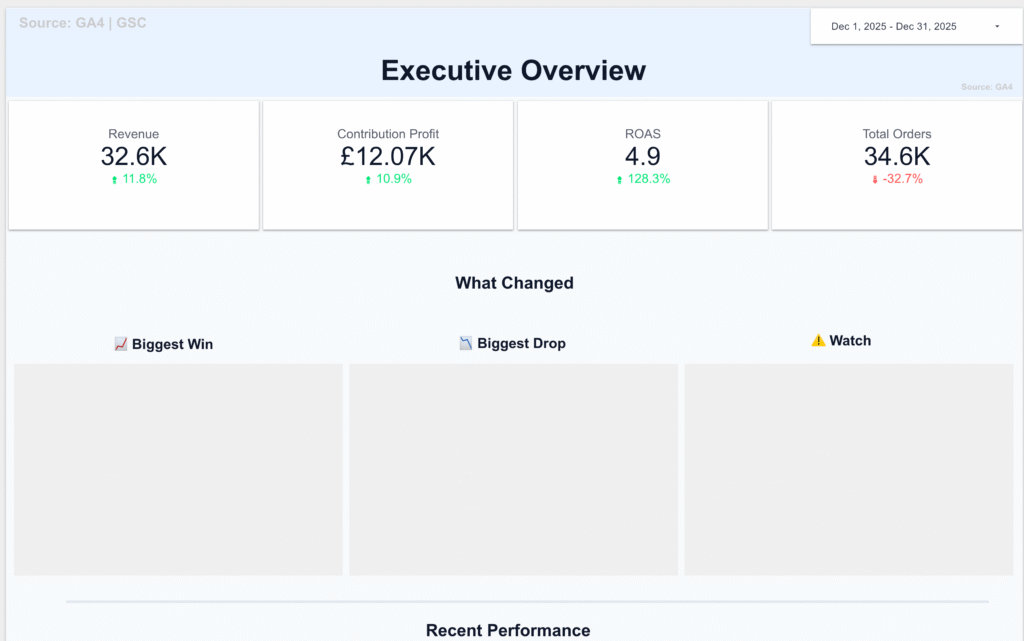
Executive Dashboard
A one or two-page snapshot covering the numbers leadership actually looks at: revenue, margin, top-line spend, and key ratios. Designed to be read in under two minutes.
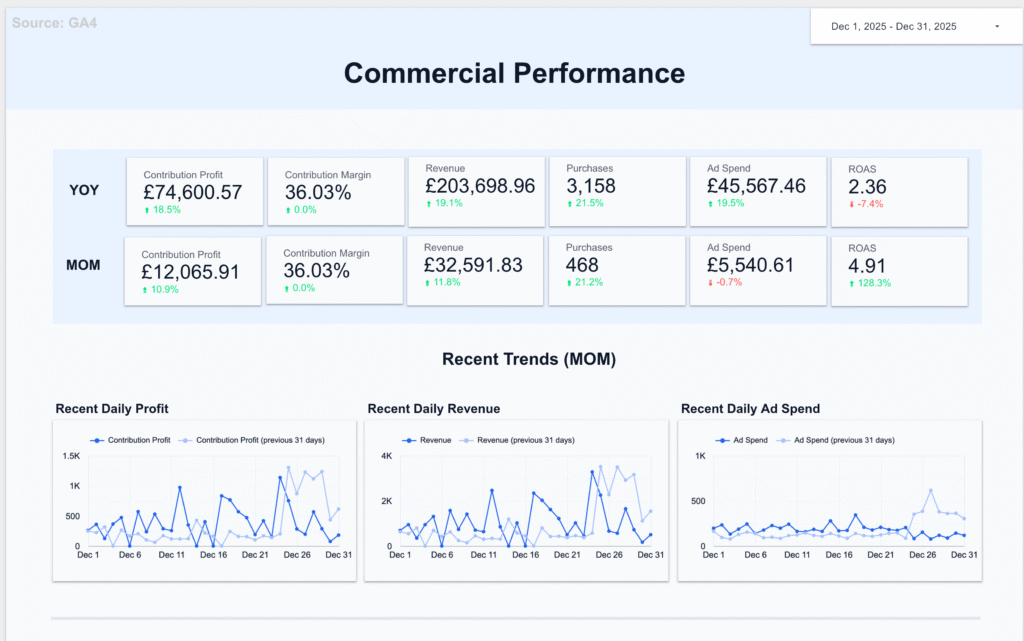
Marketing & Performance Dashboard
Covers commercial performance, traffic and engagement, paid media, and organic/SEO. Semrush data included if connected.
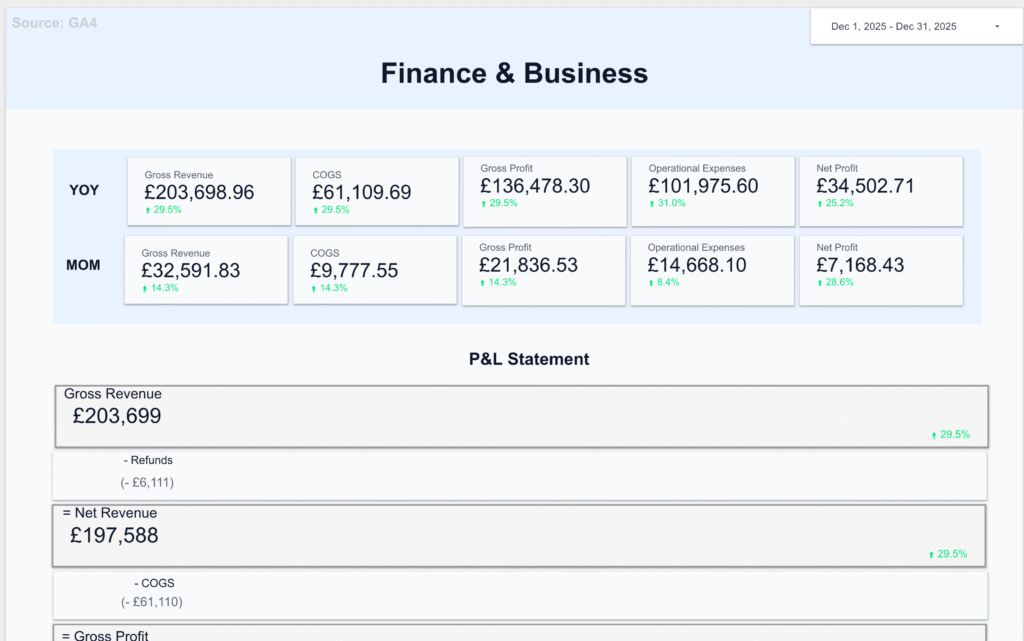
Finance & Business
P&L and budget vs actuals, sales pipeline, and product performance. Built for whoever owns the numbers.
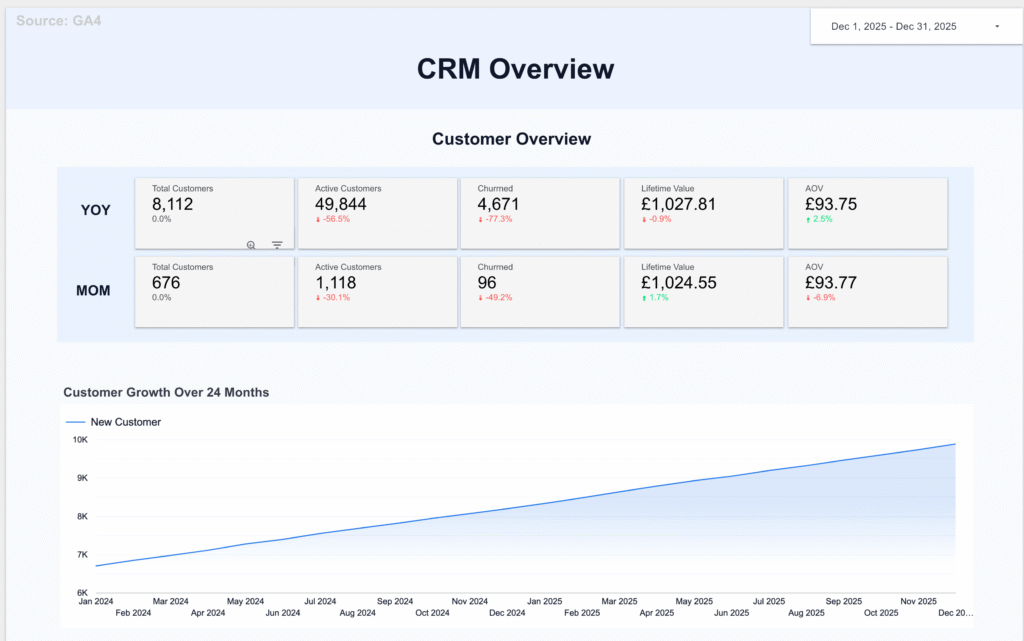
Customer Operations
CRM activity, helpdesk ticket volumes, and email marketing performance. Keeps customer-facing teams informed without manual reporting.
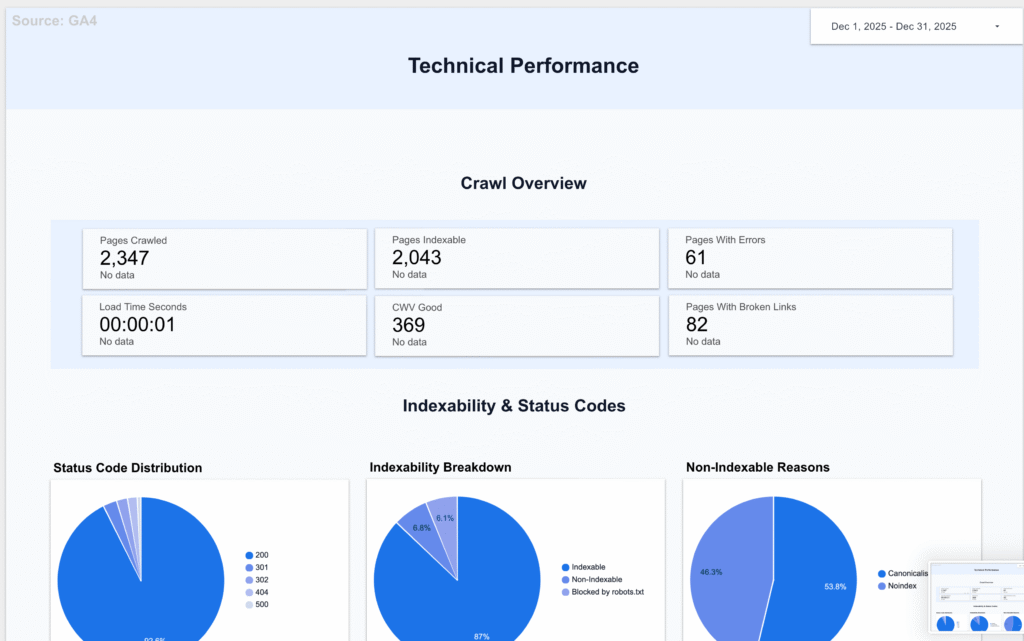
Technical Performance
Screaming Frog crawl data and Core Web Vitals. Useful for dev and SEO teams tracking site health week to week.
Integrations & delivery options
Delivery can be set to your preferred channels and systems. We can also keep an audit in Sheets, Airtable or BigQuery.
- Chat & inbox: Slack, Microsoft Teams, Google Chat, Email
- Tasks: Asana, Jira, ClickUp, Trello, Monday.com
- Helpdesk: Gorgias, Zendesk, Freshdesk, Help Scout
- Data sinks: Google Sheets, Airtable, BigQuery
If your preferred platform is not listed, please email us at hello@altomate.co.uk.
Pricing
Plans scale with your ad spend under management. Every plan includes the daily UTM Guardrail tracking audit and anomaly alerts — so you catch problems the day they happen, not at month‑end.
Core
For brands spending up to ~£20k/mo on ads
- Executive & Performance dashboards
- UTM Guardrail — daily tracking audit
- 3 anomaly alerts, tuned to your setup
- 1 workflow automation
- Weekly Loom walkthrough
Growth
For brands spending ~£20–60k/mo on ads
- Everything in Core, plus:
- 5 anomaly alerts
- 2 workflow automations
- Priority support
- Added dashboard depth (confirm scope)
Pro
For scaling brands spending £60k+/mo on ads
- Everything in Growth, plus:
- 8 anomaly alerts
- 3 workflow automations
- Market & channel splits
- Custom executive reporting
We’ll find tracking issues in your first audit — or your setup is free.
Need Help? Start Here
Frequently Asked Questions
What’s included?
Dashboards: A branded Looker Studio report with executive and performance pages, built around your KPIs with filters for date, channel, and market.
Alerts: Daily or weekly anomaly checks on the signals you choose (ROAS, add-to-cart rate, checkout rate, revenue, sessions), sent to Slack, Microsoft Teams, Google Chat, or email. Each one includes seven-day context and a link back to the report.
Workflow automation: One automation included in the build—Low-Stock Pings, 404 → Redirect Map, or UTM Guardrail. We’ll help you pick the right fit during discovery.
Setup and handover: Access checklist, full configuration, and a short Loom walkthrough covering how to read the report and adjust thresholds yourself.
Where do alerts and tasks go?
Alerts can be sent to Slack, Microsoft Teams, Google Chat, or email—and routed by team so the right people get the right notifications. Follow-up tasks can be raised automatically in Asana, Jira, or ClickUp, or logged to Google Sheets or Airtable for an audit trail.
If your platform isn’t listed, email us at hello@altomate.co.uk and we’ll confirm whether we can integrate it.
How long does setup take?
Two weeks from kickoff in most cases. Discovery takes 45 minutes, configuration and alert testing run across days 1–7, and the workflow automation plus handover sit in days 8–14. The timeline can shift slightly if data access takes longer to arrange on your side.
What access do you need?
Viewer or read-only access to the platforms we’re pulling from—typically GA4, your ad accounts (Google Ads, Meta, and similar), and your store or CRM (Shopify, HubSpot, Salesforce). We work on least-privilege access by default, and can deploy the reporting inside your own Google Cloud project if that’s preferred.
How is pricing structured?
Monthly retainer with a one-off setup fee. The tier depends on how many data sources you need connected and your reporting cadence. Full details are on the service page, or we can walk you through the options on a discovery call.
Is there a minimum contract?
No minimum on the retainer—it runs month to month. The setup fee is a one-off regardless of how long you stay.
Who owns the dashboard and alerts after handover?
You do. The Looker Studio report sits in your Google account, and if you’ve opted for deployment inside your own Google Cloud project, the alerts run from your infrastructure too. If you end the retainer, everything keeps running—you just lose the monthly iteration and support.
Can we adjust the dashboards and alerts ourselves?
Yes. The handover walkthrough covers how to change alert thresholds, add or remove metrics, and edit dashboard filters. Bigger changes—new data sources, new automations, major layout updates—are handled by us and included in the monthly retainer.
Do you only work with e-commerce brands?
E-commerce is where most of our work lands, but the setup fits any business with a clear set of KPIs and a few data sources to connect. If you’re unsure whether it’s a fit, tell us what you’d want on the dashboard and we’ll be upfront about whether we’re the right team for it.
What if we already have a Looker Studio setup?
We can audit what you have and either rebuild it cleanly or add the alert layer and workflow automation on top of your existing report. Discovery is the quickest way to work out which makes more sense.
Contact Us
If you have any questions, please contact us at hello@altomate.co.uk or by using the contact form below.